TLS you control end to end
Import client certificates and custom CA bundles for mutual TLS. An SSL verification switch covers development against self-signed or internal certificates.
Tiger stores every request as a plain text file your team reviews like code. No vendor cloud, no accounts to provision, and your data stays on machines you control.
Cloud API clients made collections a SaaS subscription. Tiger makes them versioned, reviewed and owned by your team.
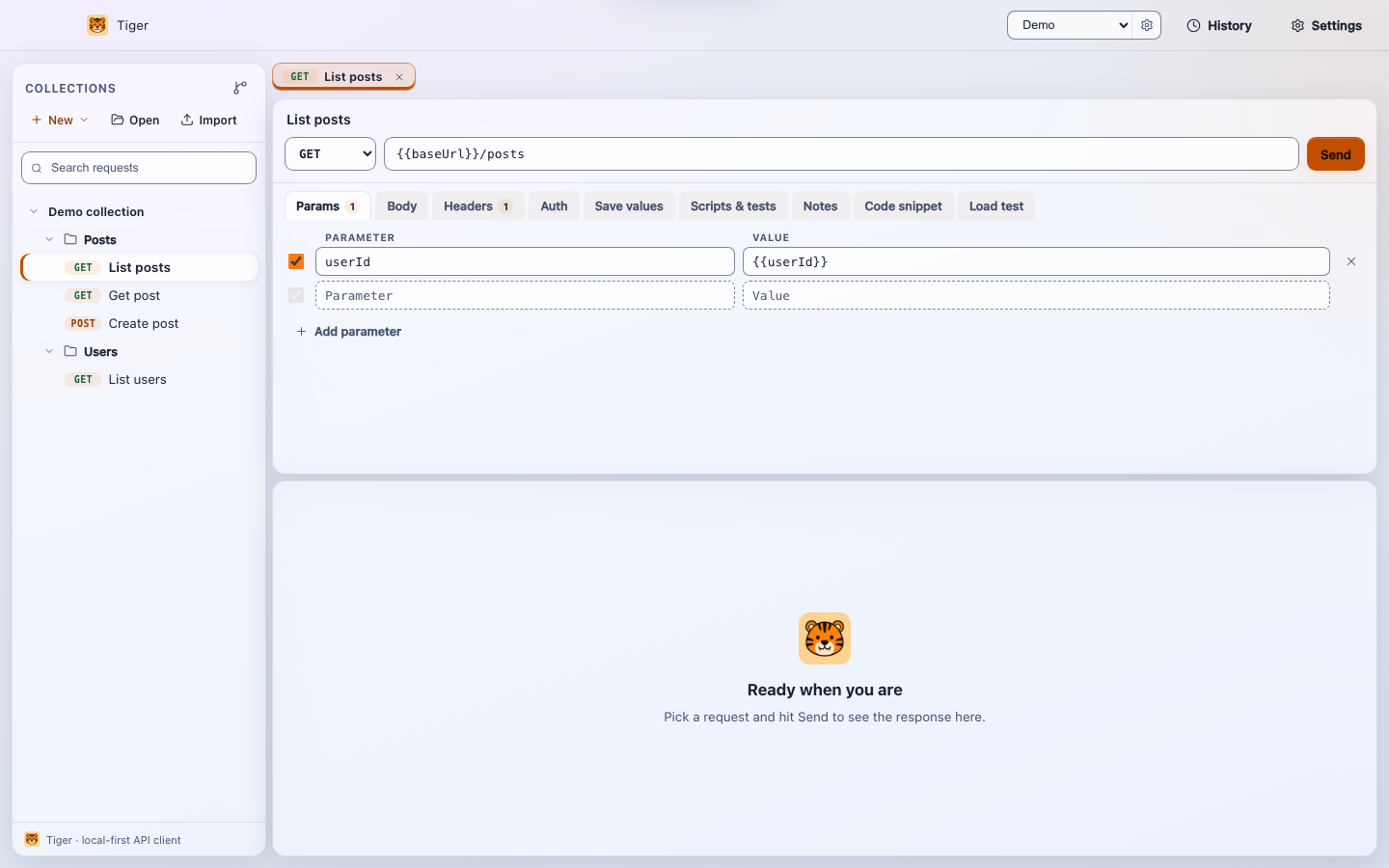
Collections are folders of .tiger files; every request is a reviewable plain-text file. Branch them, diff them in pull requests, and onboard new engineers with git clone. Request chaining via capture blocks lets one request feed its response values into the next.
Import client certificates and custom CA bundles for mutual TLS. An SSL verification switch covers development against self-signed or internal certificates.
Open multiple requests in parallel tabs without losing your place. Attach markdown documentation to any request so context travels with the collection, not a separate wiki.
OAuth 2.0 client credentials with automatic token exchange, Bearer, Basic and API keys. Secrets resolve from environment files you keep out of Git. Dynamic variables like {{$uuid}} and {{$timestamp}} generate fresh values on every send.
GraphQL body editor with schema introspection, SOAP envelope bodies, and standard REST. JSON prettify and minify helpers keep response payloads readable without leaving the app.
Tiger ships a Model Context Protocol server, so Claude and other MCP clients can list, inspect and run your collections in agentic workflows without any extra tooling.
Cookies set by one request are available to subsequent ones automatically. The cookie jar is per-environment, so staging and production sessions never bleed into each other.
Fire any request hundreds of times with bounded concurrency and read back p50 and p95 latency right inside the client. No separate monitor subscription needed.
Import Postman, Insomnia, Bruno, OpenAPI or Swagger, or paste a curl command. Export back to Postman v2.1 or OpenAPI 3.0. REST, SOAP, GraphQL, multipart file uploads, and code generation for curl, fetch and Python.
Factual differences that matter to a platform or security review.
| Capability | Tiger | Postman | Bruno |
|---|---|---|---|
| Collections stored as plain files in Git | Yes | Cloud workspace (local collections available on paid plan) | Yes |
| Account required | Never | Required for most features | Never |
| Works fully offline | Yes | Limited without cloud sync | Yes |
| Built-in performance runs | Yes | Paid-tier monitors | No |
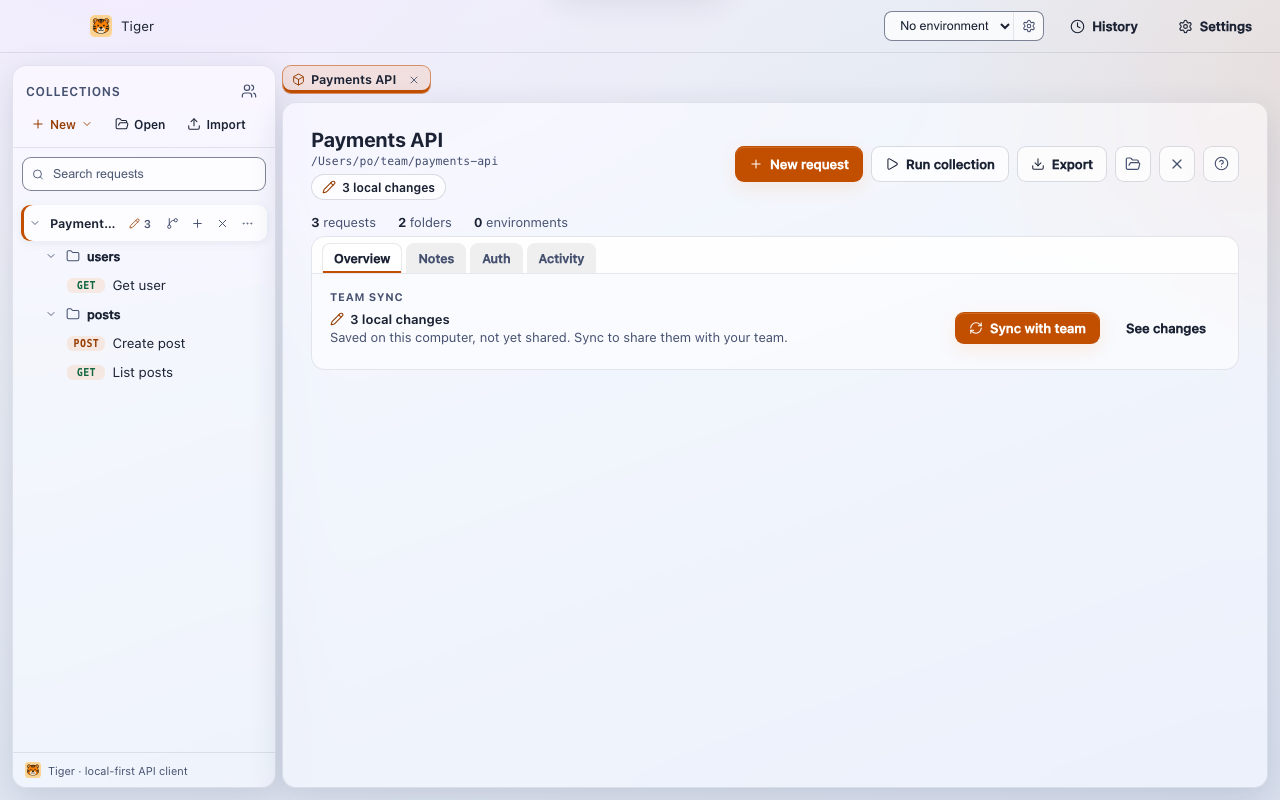
| One-button team sync with plain language | Yes, via Git | n/a, uses cloud sync | Manual Git workflow |
| MCP server for AI clients | Yes | No | No |
| Free to start | Yes | Freemium | Yes |
Import your existing Postman collections (v2.0 and v2.1), Insomnia v4 exports, Bruno folders, and OpenAPI 3 or Swagger 2 documents. Folders, headers, query parameters and bodies carry over, with variable references preserved. Environment values and auth settings are entered once in Tiger, then live in files your team shares.
Exports work too: whole collections back to Postman v2.1 or OpenAPI 3.0, single requests as .tiger files or curl commands. You are never locked in, not even to Tiger.
meta { name: staging } vars { baseUrl: https://api.staging.acme.dev idp: https://id.staging.acme.dev clientId: acme-ci ~clientSecret: kept-out-of-git }
There is no server side: no vendor storage of your request data, no DPA to sign for API payloads, no vendor breach-notification clause to negotiate.
Request definitions, history and settings are stored locally. Your API calls go to your APIs and nowhere else.
No accounts, no background sync, no server side. The only network calls are your API requests, an optional update check and analytics you control.
Anonymous app events only, sent solely to a GA4 property you configure yourselves. Out of the box nothing is sent anywhere, and one switch in Settings turns the feature off entirely.
Version 0.3.1, free for personal and commercial use. These are early preview builds and are not yet code-signed.
macOS: signed with a Developer ID and notarized by Apple, so it opens normally.
Windows, recommended: install with the built-in package manager, no
SmartScreen prompt: winget install TaoufikJabbari.Tiger
Windows, direct download: the installer is not yet code-signed, so SmartScreen may warn. Click More info, then Run anyway. Tiger is applying to the SignPath Foundation for free open source code signing.
| Platform | File | Size |
|---|---|---|
| macOS · Apple Silicon | Tiger-0.3.1-mac-arm64.dmg | 127 MB |
| macOS · Intel | Tiger-0.3.1-mac-x64.dmg | 134 MB |
| Windows · Installer | Tiger-Setup-0.3.1-windows-x64.exe | 98 MB |
| Windows · Portable | Tiger-Portable-0.3.1-windows-x64.exe | 97 MB |
| Windows · ZIP | Tiger-0.3.1-win-x64.zip | 136 MB |
On your machines and in your Git repositories, nowhere else. Tiger has no cloud backend, no sync service and no accounts, so request definitions, tokens and response data never leave your infrastructure.
Tiger is free to download and use today, including for commercial work. Advanced team features may become paid in a future release; pricing will be announced before anything changes for existing users.
Export each Postman collection as v2.0 or v2.1 JSON, or your Insomnia data as a v4 export, and import it from the sidebar. Folders, headers, query parameters and bodies carry over, with variable references preserved. Environment values and auth settings are entered once in Tiger. OpenAPI and Bruno import too, and collections export back to Postman or OpenAPI 3.0.
Yes. HTTP, HTTPS and SOCKS proxies are supported, SSL verification can be switched off when developing against self-signed or internal certificates, and redirects and timeouts are configurable.
With the Git workflow you already run. Collections are plain text files, so sharing is a repo, review is a pull request, and history is git log. New engineers get everything with git clone.
Standard installers per platform: DMG for macOS and NSIS installer or portable EXE for Windows. Push them with your existing deployment tooling. No accounts or license keys to provision. Linux and ZIP builds are available on request.
Free to get started. Import your Postman collections and see them in your next pull request.
Why teams are leaving Postman in 2026, and how Tiger compares.
Move your collections over in a few steps. No account needed.
Connect Claude or Cursor to your collections with the built-in MCP server.
A side-by-side, honest feature comparison.
Two git-native API clients compared, fairly.