Collection runner
The collection runner executes every request in a folder (or an entire collection) one after another. Pre-request scripts fire before each send, captures thread response values into variables for the next request, and post-response script assertions produce per-request pass/fail verdicts - all shown live as the run progresses.
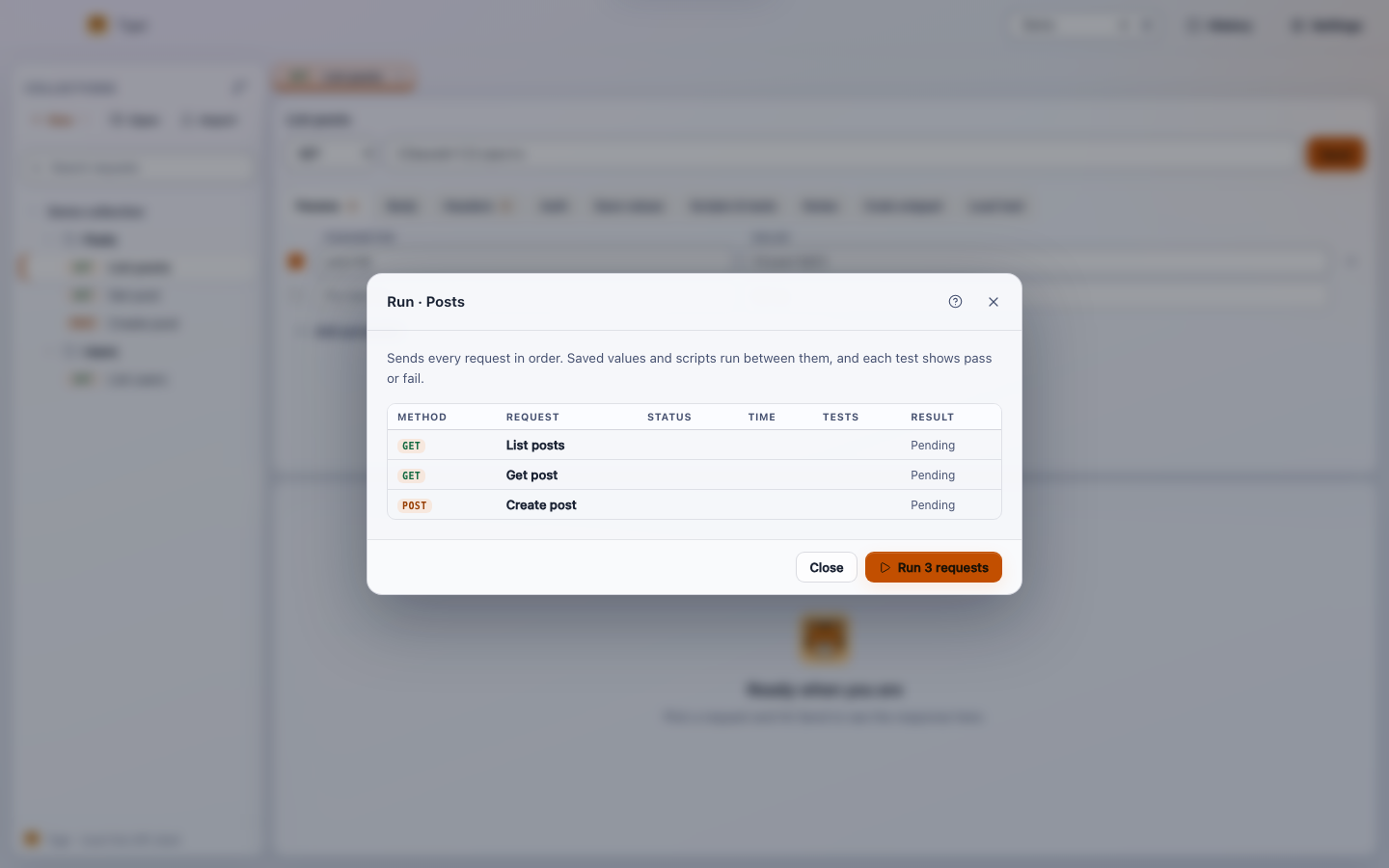
Opening the runner
Click any folder or collection in the sidebar to open its page as a tab. The page has a Run button in the toolbar. Clicking it opens the runner panel for that scope: if you click a folder, only the requests inside that folder (and its subfolders) run; if you click the collection root, every request in the collection runs.
Requests are executed in the order they appear in the sidebar - the same order controlled by
the seq field in each .tiger file. Drag requests in the sidebar to
change that order before running.
How a run works
The runner processes items sequentially, never in parallel. For each request:
-
Pre-request script runs first (if the request has one). The script can
read and write variables using
tiger.setVar/tiger.getVar. Any variable it sets is available to the URL, headers, body and auth of this request and every request that follows. -
The request is sent with the current variable set applied via
{{variable}}interpolation. - Save values (captures) extract values from the response (status code, a header, or a JSON body path) and write them into named variables. Those variables are available to all subsequent requests in the same run.
-
Post-response script runs (if present). It can inspect
tiger.response, set more variables, and declare named assertions withtiger.test. -
The request is marked passed when the HTTP status is below 400 and every
tiger.testassertion in the post-response script passed. Requests with no script tests pass on the status code alone.
If a pre-request script throws, or a transport error occurs, the request is marked failed with the error message and the runner moves on to the next item. The shared variable state at the point of failure is preserved so subsequent requests still have everything captured so far.
A Stop button is available while the run is in progress. Clicking it signals the runner to skip remaining requests after the current one finishes. The summary reports how many items were completed and marks the run as stopped.
Live results panel
As each request settles the runner panel updates immediately - you do not wait for the whole run to finish before seeing results. Each row shows:
- Request name and HTTP method.
- HTTP status code and response time in milliseconds.
- A PASS or FAIL badge.
- Individual test names and their pass/fail state, when the request has script assertions.
- The error message if a script or transport error aborted the request.
A summary bar at the top of the panel shows the running total of passed and failed requests and updates after each item.
Writing assertions
Assertions live in the post-response script. The scripting API is the same as for individual
requests - see Scripting for the full reference. The key
method for the runner is tiger.test:
// Post-response script on any request
tiger.test("status is 201", () => {
  tiger.expect(tiger.response.status === 201, `got ${tiger.response.status}`)
})

tiger.test("response has an id", () => {
  tiger.expect(tiger.response.json.id != null, "id is missing")
})

tiger.test("responds under 500 ms", () => {
  tiger.expect(tiger.response.timeMs < 500, `took ${tiger.response.timeMs} ms`)
})
tiger.test(name, fn) registers a named assertion. If fn throws,
the test is recorded as failed with the thrown message. tiger.expect(condition, message)
is a convenience that throws when the condition is falsy.
Scripts run in a sandboxed Function scope. They cannot access
fetch, require, process, DOM globals, or any other
ambient host API - only the tiger object and console.log (output
appears in the script console, not the terminal).
A request with no post-response script is judged purely by status code. It passes when the
status is below 400 and fails otherwise. You only need to add tiger.test calls
when you want to assert something beyond "the server responded without an error."
Chaining requests with captures
The runner shares a single variable map across all requests in the run. Captures declared in
the .tiger file (or via the Save values tab in the editor) automatically feed that
map as each response arrives. A common pattern: authenticate first, capture the token, then
use it in every subsequent request.
| Capture source | Syntax in the Save values tab | Example |
|---|---|---|
| HTTP status code | status |
Stores 200 |
| Response header | header.<name> |
header.x-request-id |
| JSON body path | body.<path> |
body.data[0].id |
A minimal example using the .tiger format directly:
meta {
  name: Login
  seq: 1
}

post {
  url: {{baseUrl}}/auth/token
}

body:json {
  { "client_id": "{{clientId}}", "client_secret": "{{clientSecret}}" }
}

capture {
  accessToken: body.access_token
}
The next request in the folder can reference {{accessToken}} in its
auth:bearer block or anywhere else. The runner writes the captured value
immediately after the response arrives, before the next request's pre-script runs.
A typical test workflow
A practical sequence for testing a REST resource lifecycle:
-
Request 1 - POST /items: create a resource. Capture
body.idintocreatedId. Assert status 201 and thatidis present. -
Request 2 - GET /items/{{createdId}}: fetch the resource. Assert status
200 and that the returned
namematches what was sent. - Request 3 - PUT /items/{{createdId}}: update it. Assert status 200 and that the updated field reflects the change.
- Request 4 - DELETE /items/{{createdId}}: delete it. Assert status 204.
- Request 5 - GET /items/{{createdId}}: confirm deletion. Assert status 404.
Run the folder. The live panel shows each row going green as the run progresses. If step 3 fails, steps 4 and 5 still run (the runner does not stop on failure by default), so you see the full picture before investigating.
Variable state accumulated during a run is discarded when the run finishes - it does not persist back to the active environment. This keeps runner runs repeatable: the environment you started with is the environment you have after the run ends.
Environment selection
The runner uses whichever environment is currently active in the environment selector at the top of the window. Switch environments before clicking Run to target a different API base URL or credential set. The runner takes a snapshot of the variable map at the moment the run starts; changing the environment mid-run has no effect on the in-progress execution.
Stopping a run
Click Stop in the runner panel while a run is in progress. The runner finishes the request currently in flight, then halts. The summary panel shows the partial results and marks the run as stopped. You can re-run immediately using the same Run button.
Runner vs load test
The collection runner is for correctness: it runs each request once, in sequence, and grades pass/fail. The Load test tab of a request (also Request > Load test in the menu) is for load: it fires the open request N times at a configurable concurrency level and reports min, max, avg, p50 and p95 timings.