Scripts, tests and Save values
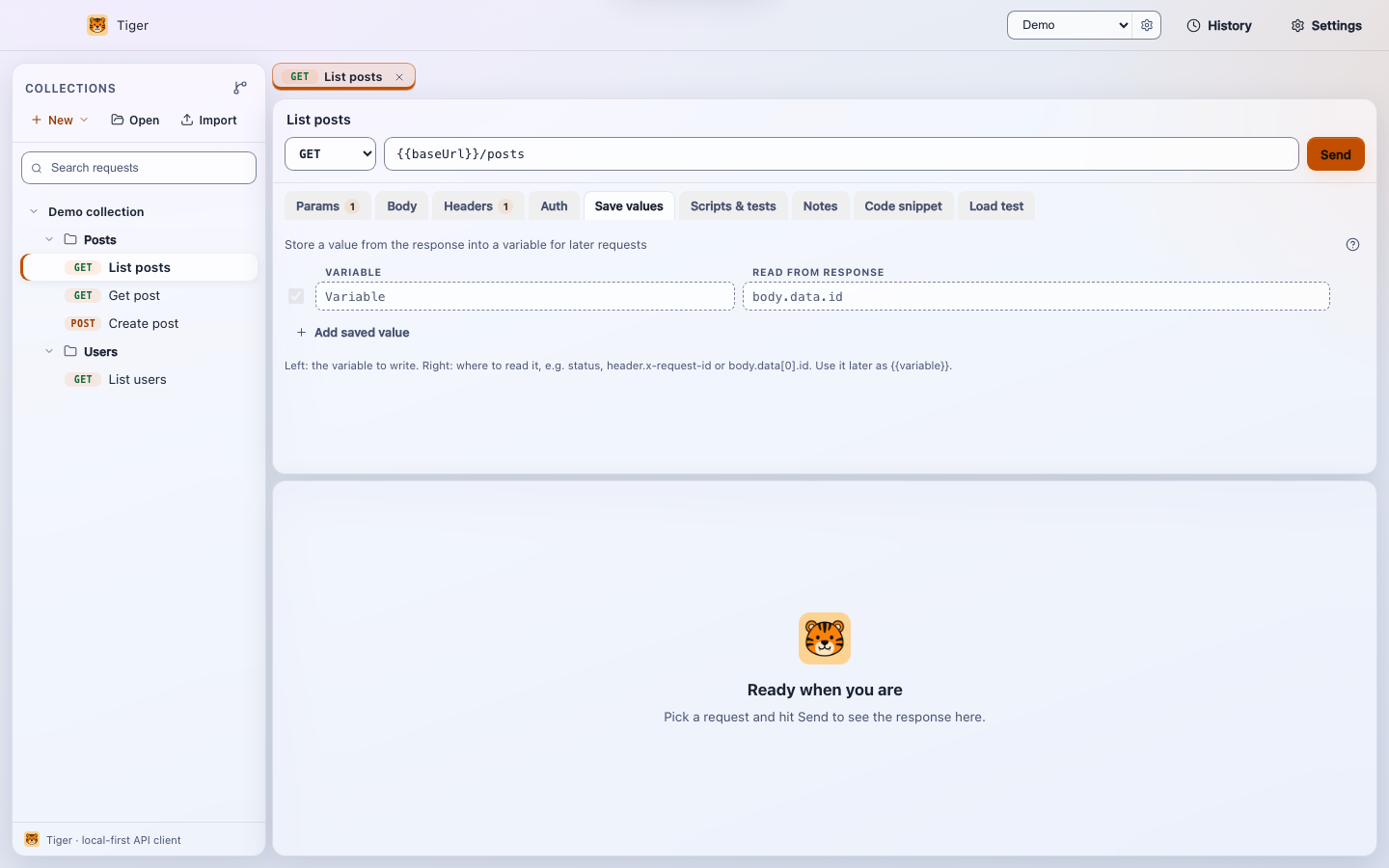
Tiger lets you attach small JavaScript snippets to any request: a pre-request script that runs before the HTTP call is made, and a post-response script that runs after the response arrives. A separate captures table (the Save values tab) extracts values from the response and writes them into environment variables automatically, with no code required.
Overview
Scripts and captures address two complementary needs. Captures handle the common case of chaining requests - log in, grab the token, use it in the next call - using a simple point-and-click table with no JavaScript. Scripts handle everything else: computing a dynamic header value, seeding a variable before sending, asserting on response shape, or logging intermediate values during a collection run.
Both the preScript and postScript fields are stored
verbatim in the .tiger file, so they are version-controlled alongside
the request they belong to.
Scripts run in a sandboxed Function context. They have access only
to the tiger API and console.log. Globals like
fetch, require, process, window,
and document are deliberately shadowed and unavailable.
The tiger API
Every script receives a single tiger object. Its surface is intentionally
small and stable.
Variable access
// Read a variable from the active environment.
const base = tiger.getVar('baseUrl')

// Write a variable. It merges back into the active environment
// and is available to all subsequent requests in the same session.
tiger.setVar('authToken', 'Bearer abc123')
tiger.setVar('retryCount', 0)   // non-string values are coerced to string
tiger.getVar(name) returns undefined when the variable
does not exist in the active environment. tiger.setVar(name, value)
converts the value to a string; passing null or undefined
writes an empty string.
Logging
tiger.log('token length:', tiger.getVar('token')?.length)
tiger.log({ status: tiger.response?.status })
Output appears in the Script console pane below the editor. Objects are
JSON-serialised. You can also use the browser-style console.log(...)
shorthand - it maps to the same output buffer.
Response (post-response scripts only)
In a post-response script, tiger.response is populated:
tiger.response.status      // number, e.g. 200
tiger.response.timeMs      // round-trip time in milliseconds
tiger.response.body        // raw response body as a string
tiger.response.json        // parsed JSON, or undefined if the body is not valid JSON
tiger.response.headers     // Array<{ name: string; value: string }>
tiger.response is undefined in pre-request scripts.
Accessing it there will throw, so guard with a check if you share code between phases.
Assertions
tiger.test('status is 200', () => {
  tiger.expect(tiger.response.status === 200, `got ${tiger.response.status}`)
})

tiger.test('body has id', () => {
  tiger.expect(tiger.response.json?.id != null, 'id field missing')
})
tiger.test(name, fn) registers a named assertion. The callback should
throw when the assertion fails - the easiest way is tiger.expect(condition,
message), which throws an Error with the given message when
condition is falsy. Each test appears in the response panel as a
green pass or red fail row, and in the collection runner's live verdict list.
Pre-request scripts
A pre-request script runs after variable interpolation resolves
{{variable}} placeholders but before the HTTP request is dispatched.
Use it to compute values that cannot be expressed as static variables.
Example: HMAC signature header
// Tiger's sandbox does not expose Node's crypto module, so use
// the pure-JS approach or store the value in an environment variable
// if your signing flow requires native crypto.

const ts = String(Date.now())
tiger.setVar('X-Timestamp', ts)

// The header {{X-Timestamp}} in the request will now carry this value.
tiger.log('timestamp set to', ts)
Example: conditional environment switching
const env = tiger.getVar('APP_ENV')
if (env === 'staging') {
  tiger.setVar('baseUrl', 'https://staging.example.com')
} else {
  tiger.setVar('baseUrl', 'https://api.example.com')
}
tiger.log('routing to', tiger.getVar('baseUrl'))
Example: increment a counter
const n = parseInt(tiger.getVar('seq') || '0', 10)
tiger.setVar('seq', n + 1)
tiger.log('request sequence:', n + 1)
Post-response scripts
A post-response script runs immediately after the response is received, before Tiger renders the response panel. This is where you write assertions and extract values that require conditional logic beyond what the captures table supports.
Example: save a token from a login response
tiger.test('login succeeded', () => {
  tiger.expect(tiger.response.status === 200)
})

const body = tiger.response.json
if (body?.token) {
  tiger.setVar('authToken', body.token)
  tiger.log('token saved, length', body.token.length)
}
Example: validate a paginated list response
tiger.test('status 200', () => {
  tiger.expect(tiger.response.status === 200, `expected 200, got ${tiger.response.status}`)
})

tiger.test('items array present', () => {
  const items = tiger.response.json?.items
  tiger.expect(Array.isArray(items), 'items must be an array')
  tiger.expect(items.length > 0, 'items array is empty')
})

tiger.test('response under 300ms', () => {
  tiger.expect(
    tiger.response.timeMs < 300,
    `took ${tiger.response.timeMs}ms`
  )
})
Example: read a response header
const rateLimit = tiger.response.headers
  .find(h => h.name.toLowerCase() === 'x-ratelimit-remaining')
  ?.value

tiger.log('rate limit remaining:', rateLimit)
tiger.setVar('rateLimitRemaining', rateLimit ?? '')
Captures
Captures are a code-free alternative for the most common chaining pattern: extract a value from the response and store it in a variable. Each row in the Save values tab maps a variable name to a path into the response.
Tiger evaluates captures after the response arrives, in the same phase as the post-response script. Disabled rows and paths that do not resolve are silently skipped - a failed capture never causes an error.
Path syntax
| Path | What it resolves to | Example value |
|---|---|---|
status |
The HTTP status code as a string | 201 |
header.<Name> |
A response header (name matched case-insensitively) | header.Content-Type → application/json |
body |
The entire raw response body as a string | {"id":7,"token":"abc"} |
body.<path> |
A JSON dot/bracket path into the parsed body | body.data[0].id → 42 |
JSON path examples
Given a response body like:
{
  "user": {
    "id": 7,
    "roles": ["admin", "editor"]
  },
  "token": "eyJhbGci..."
}| Variable name | Path | Captured value |
|---|---|---|
userId |
body.user.id |
7 |
authToken |
body.token |
eyJhbGci... |
firstRole |
body.user.roles[0] |
admin |
responseStatus |
status |
200 |
requestId |
header.X-Request-Id |
value of the X-Request-Id header |
Non-string values (numbers, booleans, nested objects) are JSON-serialised when written to the variable. String values are stored as-is.
Captures run before the post-response script, so a variable set by a capture
is immediately readable via tiger.getVar() inside the same request's
post-response script.
The .tiger file format
Captures appear as a capture block in the .tiger file.
A tilde (~) prefix disables a row without deleting it, consistent
with how headers and query params work:
capture {
  authToken: body.token
  userId: body.user.id
  ~debugStatus: status
}
Scripts appear as pre-script and post-script blocks
with a heredoc-style delimiter:
pre-script {
  ---
  tiger.setVar('startedAt', String(Date.now()))
  ---
}

post-script {
  ---
  tiger.test('ok', () => tiger.expect(tiger.response.status < 400))
  tiger.log('done in', tiger.response.timeMs, 'ms')
  ---
}
Scripts and the collection runner
When you run a collection folder, Tiger executes each request in sequence. Variables
set by tiger.setVar() or captures in one request are available to all
subsequent requests in the same run. Test results from every request are collected
and displayed as a live pass/fail list in the runner panel, making it straightforward
to drive an entire authentication-then-CRUD flow and verify each step.
Variables written by scripts during a collection run are applied to the active environment in memory for the duration of the run. They do not automatically persist to the environment file on disk after the run completes.
Limitations
- Scripts run synchronously. There is no
await,Promise, or async I/O. All work must complete before the function returns. - Network access (
fetch,XMLHttpRequest) is not available inside scripts. Use a second chained request for any additional HTTP calls. - Node built-ins (
require,process,Buffer,crypto) are not available. Pure-JavaScript logic is supported; native modules are not. - A script that throws an uncaught error is captured and shown in the script console
as an error message. It does not abort the request that produced the response, but it
does prevent any
tiger.setVar()calls that follow the throw from taking effect.